The control plane for dbt Core.
Studio, orchestration, lineage, catalog and a MetricFlow semantic layer for your analytics engineering team, running against your own warehouse. Self-managed deployments run entirely on infrastructure you control.
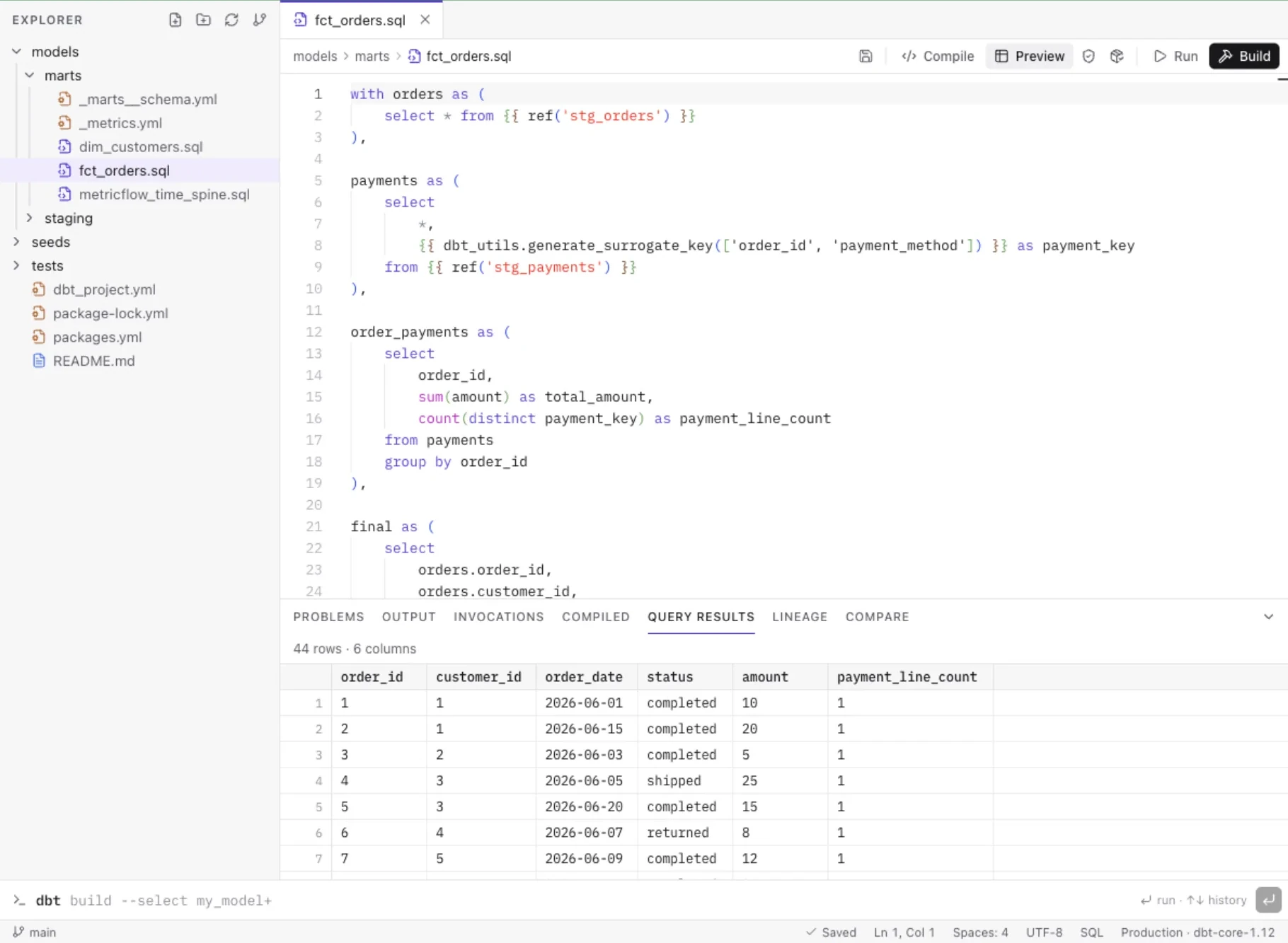
FIG 1·Screens captured from the running product, shown at 1:1.
§ 01/How it fits together
dbt Core does the work. Forewarden runs everything around it.
The same models, tests, ref() and Jinja your project already uses, built by dbt-core itself in Forewarden's worker. Forewarden adds the editor, the scheduler, the record of every run, the catalog and the metrics layer, and keeps warehouse credentials encrypted and out of the browser. On a self-managed deployment the whole stack below runs on your own infrastructure.
Notes
Develop
A real editor with compile, preview, lint and build against the environment you have open. Source control built in.
Deploy
Environments pin a connection, schema and dbt engine. Cron jobs, chaining, retries, and CI and merge jobs that start when you push from Forewarden's Git panel.
Explore
Lineage with full selector syntax, a searchable catalog with health and performance, and MetricFlow metrics.
Investigate
An optional AI Data Engineer that answers questions about the project with read-only tools, inside your own role, and keeps its evidence apart from its conclusions. Off by default.
Migrate
Turn existing Postgres tables and views into a dbt project on a new branch, verified by a build and row-level parity. Databricks import is in preview.
Integrate
REST API with scoped tokens, an MCP server, SCIM 2.0 provisioning, and notifications by email, Slack, Teams or HMAC-signed webhooks.
§ 02/Beyond dbt Core
Why it goes further than dbt Core alone
dbt Core compiles and runs your models. Everything around that is left to each team to build. Forewarden does not replace dbt Core: its worker installs dbt Core 1.12 and runs it on your project unchanged, and Forewarden provides the rest.
- Scheduling
- dbt Core has no scheduler. Forewarden runs deploy jobs on cron (shown in plain English), after another job or on demand, with retries, timeouts and a node-by-node record of every run.
- CI with deferral
- dbt Core gives you state and defer flags to wire into a CI system yourself. Forewarden's CI jobs build state:modified+ into a per-branch schema, defer to production, and compare the result with production.
- Lineage & catalog
- dbt Core generates a static docs site. Forewarden keeps a live DAG with dbt selector syntax and a searchable catalog with health, performance, profiling and column-level lineage.
- Governed metrics
- dbt Core leaves MetricFlow to a command line. Forewarden validates the semantic manifest against the warehouse and gives you an explorer with chart, table, SQL and CSV.
- Access control
- With dbt Core, whoever holds the profile can run anything. Forewarden has five project roles, and running against production takes Maintainer.
- Audit
- dbt Core logs to whichever machine ran it. Forewarden keeps an append-only audit log and the history of every run and invocation.
- Secrets
- dbt Core reads credentials from profiles.yml or environment variables on each machine. Forewarden stores them encrypted with AES-256-GCM, decrypts warehouse credentials only in the worker, and runs dbt with an allowlisted environment.
- AI investigation
- dbt Core has none. Forewarden offers an optional, read-only AI Data Engineer and an MCP server, both limited to the caller's role and both audited.
§ 03/Studio
An editor that compiles ref() and Jinja against the environment you have open
Open a model, compile it, preview rows and lint it, with results, compiled SQL, problems and lineage in one panel. Run dbt from a command bar that accepts 16 dbt commands with checked flags. Every invocation is kept in history.
- Multi-file tabs and drafts that survive a refresh
- Defer to production so unchanged parents are not rebuilt, once production has a manifest
- Diff, stage, commit, branch, pull and push, to origin and to every extra remote set to receive commits
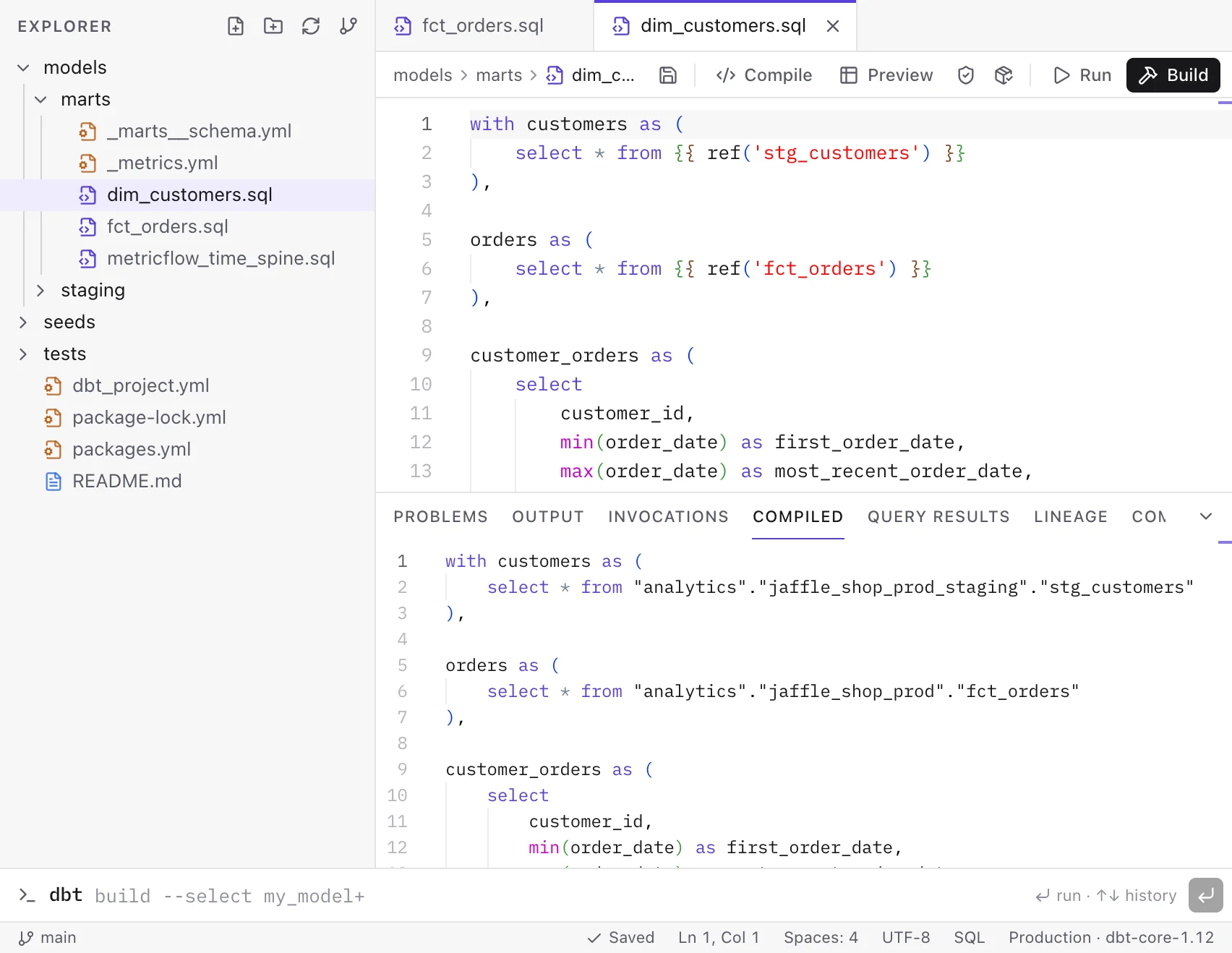
FIG 2·Compile resolves every ref() and macro against the environment you have open.
§ 04/Orchestration
A record of every run, node by node
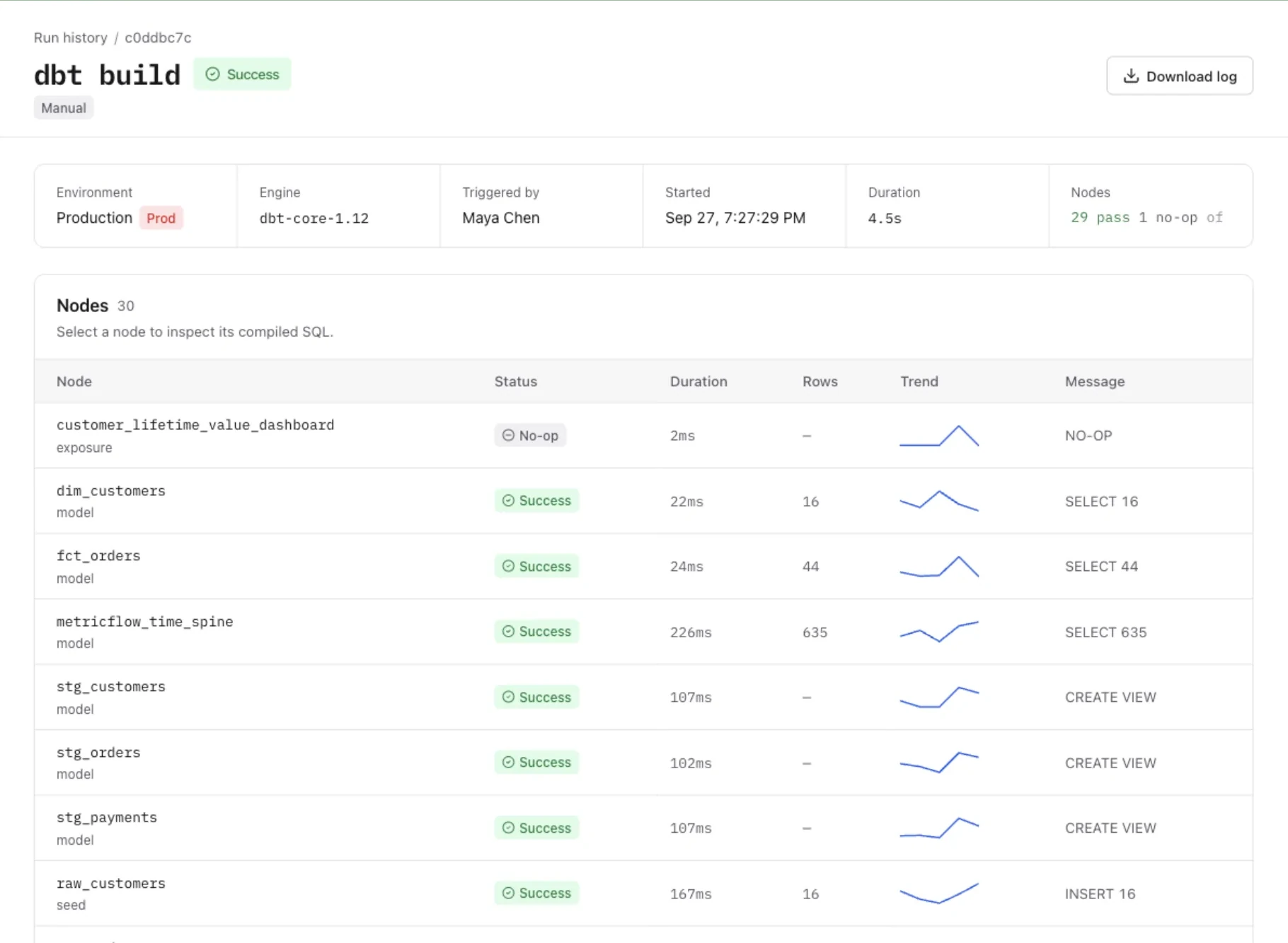
Deploy jobs run on cron, after another job, or on demand. CI jobs build only what changed when a branch is pushed from Forewarden's Git panel, and post a GitHub commit status when the project has a github.com remote with an access token. Logs stream live; each node keeps its compiled SQL, rows affected and a duration trend.
- One production run at a time per project; development runs queue per user
- A newer push to the same branch cancels the CI run it replaces
- Isolated checkout of the pinned commit for every job run
- Cancel, retry, timeouts, and a downloadable log for every run
§ 05/Lineage & catalog
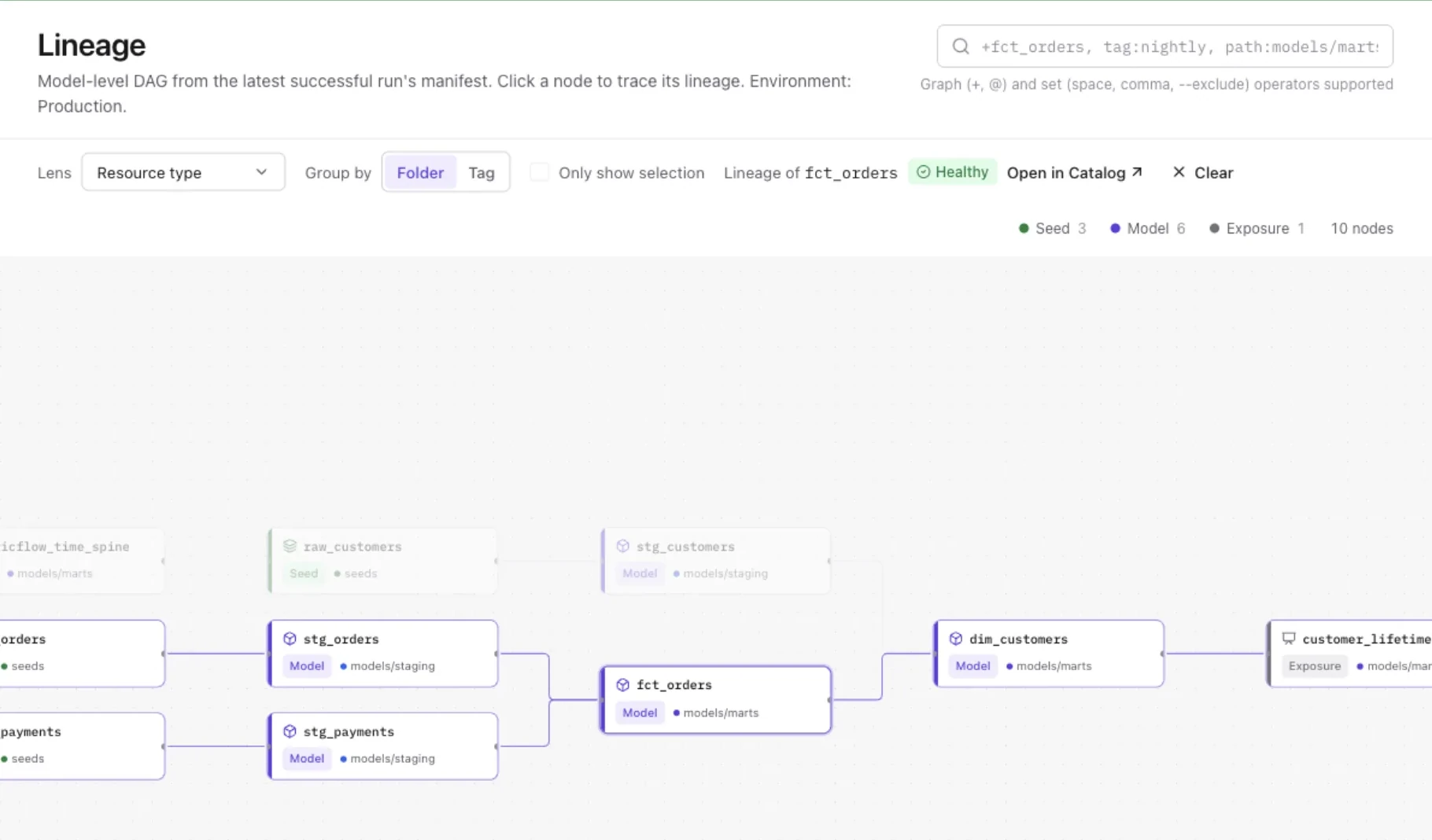
FIG 3·The DAG from the latest successful production run's manifest.
Trace any model back to its sources and forward to what depends on it
The graph understands dbt's own selector syntax and set operators. The catalog carries columns, tests, profiling, contracts, access and version badges, with health, performance and 24 recommendation rules per project. Column-level lineage and full-text search, ⌘K from anywhere.
§ 06/Semantic layer
Define a metric once, then query it the same way from the explorer or an MCP client
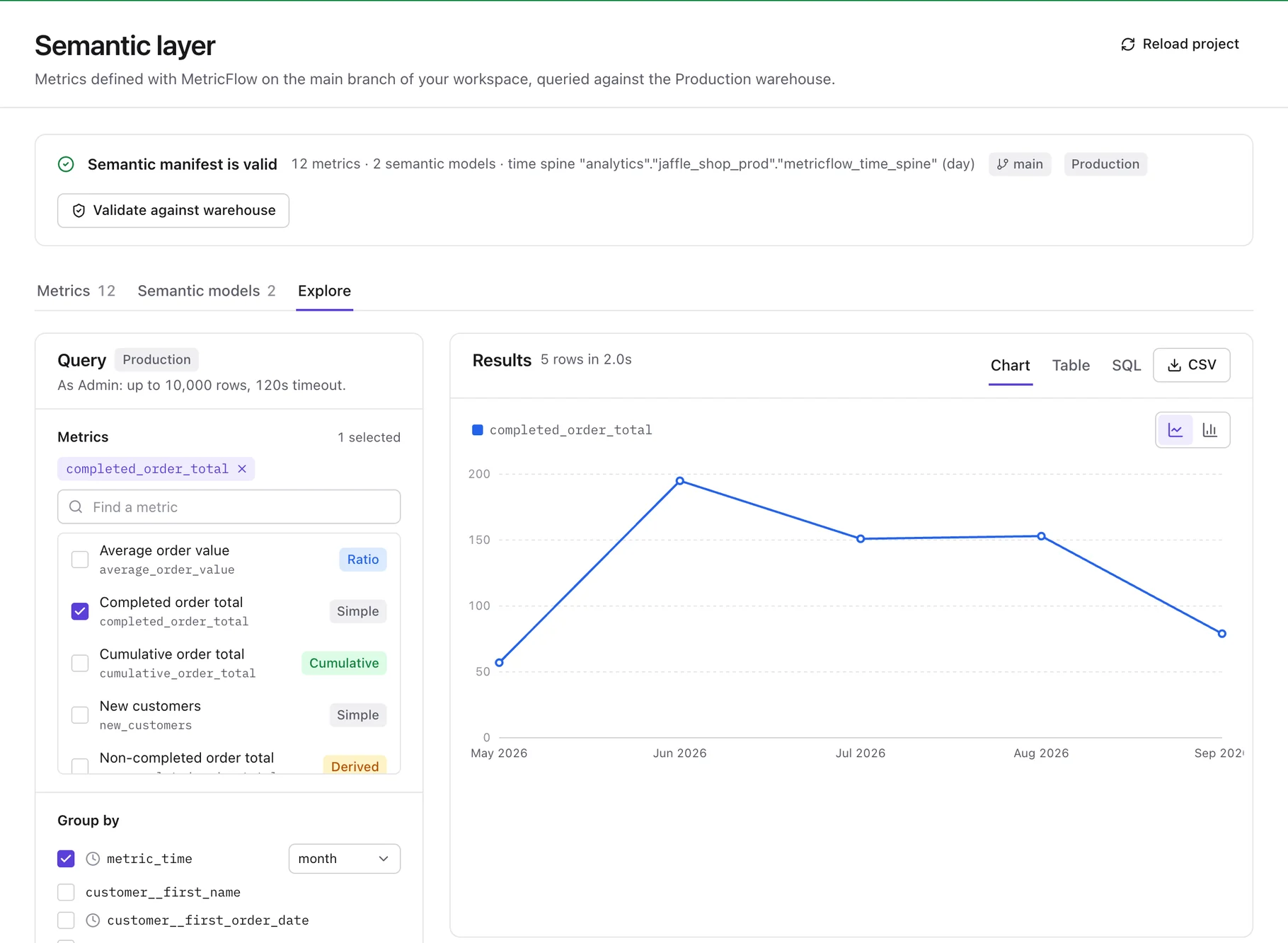
Validate the semantic manifest against the warehouse, browse simple, ratio, cumulative and derived metrics with their dimensions, then explore them by time grain and dimension with a chart, a table, the generated SQL, and CSV export. Available on 7 of the 13 warehouses; there is no BI tool connector.
§ 07/AI Data Engineer
An AI data engineer that shows its evidence
The AI Data Engineer investigates your project from a chat page or the Explain button on any catalog resource, using read-only tools inside the project and role you already have.
- Investigates
- Ask why a run failed, what a model feeds or whether a metric looks right. It works through read-only tools (project overview, search, models, lineage, health, jobs, runs, logs, read-only SQL and metrics) and shows each step as it runs. Open it from its own page, or with Explain on any catalog resource.
- Read-only
- Its tool list is fixed in code and holds no write tools: it cannot edit files, and it cannot trigger or cancel runs.
- Your role
- It is pinned to the project you opened it in and runs with your own project role, so it can see only what you can see.
- Row data
- Warehouse rows reach the AI provider only when you tick the row-data option and your role can use the SQL workspace.
- Bounded
- At most 8 rounds of up to 6 tool calls, 2,500 output tokens per turn and 150,000 tokens per session.
- Evidence
- Each answer lists the facts it found, with the steps that show them, separately from its own conclusions.
- Audit
- Every tool call is written to the append-only audit log. Sessions are kept in an AI ledger as hashes and Forewarden-written summaries, not prompts or responses.
- Assistant
- The same provider key powers single-shot helpers: ask about the project, draft model SQL, documentation and tests as changes you apply or discard, and explain compile, lint and run failures.
A system admin turns it on in Admin → AI with an Anthropic, OpenAI or Azure OpenAI key, then enables the agent; users need the Analyst role or higher. It is in preview: it has been exercised against local provider stand-ins, not yet against a live provider account. The single-shot helpers do not generate semantic models.
§ 08/Warehouses
Thirteen warehouses, and a straight answer on each
Forewarden runs dbt Core through each warehouse's own dbt adapter. Five have run end to end against a real instance; the other eight stay in preview until they have.
- Tested
PostgreSQL
dbt-postgres
- Tested
SQL Server
dbt-sqlserver · incl. Azure SQL
- Tested
Oracle
dbt-oracle
- Tested
Trino / Starburst
dbt-trino
- Tested
ClickHouse
dbt-clickhouse
- Preview
Databricks
dbt-databricks
- Preview
Snowflake
dbt-snowflake
- Preview
Google BigQuery
dbt-bigquery
- Preview
Amazon Redshift
dbt-redshift
- Preview
Azure Synapse
dbt-synapse
- Preview
Microsoft Fabric
dbt-fabric
- Preview
Amazon Athena
dbt-athena
- Preview
Teradata
dbt-teradata
- Tested
Run end to end against a real or Dockerized instance of the warehouse.
PreviewValidated against the vendor's dbt adapter and driver, but not yet run against a live account.
§ 09/Administer & integrate
The parts an IT review asks about first
Sessions expire (8h idle, 12h absolute) and record IP and client. dbt, git and SQLFluff run with an allowlisted environment, so a project's env_var() can never read the master key.
Security & access
- Access
- Five project roles, system administrators, Microsoft Entra ID sign-in, TOTP MFA with recovery codes, and passkeys.
- Provisioning
- SCIM 2.0 (Users, Groups) with group-to-role mappings per project. Deprovisioning ends the user's sessions immediately. Provisioned users sign in with Microsoft Entra ID, the only single sign-on provider today.
- Network
- CIDR IP allowlist checked on every request before any route runs, with a confirmation step before you exclude your own address.
- Audit
- Append-only audit log, enforced by a database trigger, with filters and CSV export. Every AI Data Engineer and MCP tool call is recorded in it.
Integrate
- REST API
- Projects, jobs, runs, trigger, cancel, logs and artifacts, with personal and service tokens that are hashed at rest and revocable.
- MCP server
- Streamable HTTP at /api/mcp with the same tokens: list models, get lineage and health, search the catalog, trigger and inspect runs, run read-only SQL, query metrics. Each tool has a minimum project role.
- Notifications
- Email via AWS SES, Slack and Teams incoming webhooks, and generic webhooks signed with HMAC-SHA256.
- Secrets
- Warehouse credentials and tokens are envelope-encrypted with AES-256-GCM and never reach the browser.
Connect a warehouse. Build your first models this afternoon.
Start with a managed repository and a starter project, or start from a warehouse you already have. On a self-managed deployment an administrator can also connect an existing repository. Thirty days, no card on file.